
Head Tracking
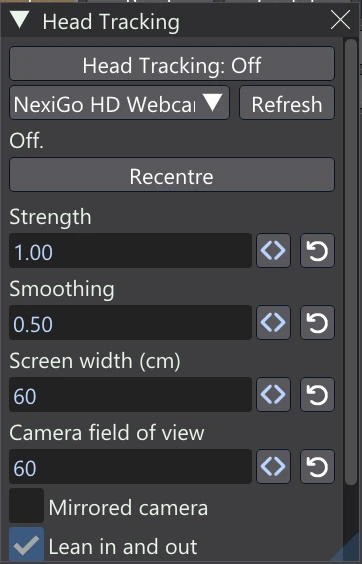
With a webcam, Vertexix can follow your head and move the 3D view with it, as if the screen were a window onto the scene. Lean left and you see a little more of the model's left side. What sits in front of the screen's surface swings one way and what sits behind it swings the other, just as when you look through real glass. The plane through the point the view orbits stays fixed on screen, like the glass itself.
Only the 3D view's perspective panes move. The sidebars, the docked and floating windows, and orthographic panes are not affected.
Opening the window
Choose Window > Head Tracking. It is a regular panel: move, resize or dock it like the app's other windows.
Turning it on
- Pick your webcam in the dropdown. Phone and streaming-app “virtual” cameras are listed too; the first real camera is chosen until you pick one. Press Refresh after plugging a camera in.
- Press Head Tracking: Off to turn it on. Sit as you normally do. Half a second after your face is found, that head position becomes “straight ahead”.
- Move your head. The status line shows the frames a second and how far away your face is.
Recentre makes wherever your head is half a second later the new straight ahead. Use it after you change how you sit. If no face is found, the view eases back to straight ahead.
The camera is on only while Head Tracking is. It is never switched on by itself when the app starts. Nothing the camera sees is saved or sent anywhere: frames are only used to find your face, then discarded. The small picture in the window (with the face found boxed) is shown only while Show the camera is ticked.
Settings
| Control | What it does |
|---|---|
| Strength | 1 is a true window: the scene moves exactly as it would behind glass the size of your screen. Higher exaggerates the effect, lower calms it; 0 turns it off. |
| Smoothing | Higher holds the view steadier while your head is still; lower follows more quickly. Fast head moves always come through. |
| Screen width (cm) | The visible width of your monitor. Together with the camera's view it turns a move of your head into a move of the view. |
| Camera field of view | Your webcam's horizontal angle of view in degrees (most are 60 to 78). It sets how far away your face is read. |
| Mirrored camera | Turn on if the view moves the wrong way when you move left and right (some cameras send a mirrored picture). |
| Lean in and out | Moving closer to the screen or further back moves the view too. |
| Hold while dragging | The view holds still while a mouse button is down over it, so a brush stroke or a drag does not drift. |
| Show the camera | Shows the camera's picture in the window, mirrored, with the face found boxed. |
The settings are kept between sessions; the on/off switch is not.
Notes
- Clicks, brushes and gizmos follow the moved view, so everything lands where you see it.
- Head Tracking works for one viewer: the person the camera sees.
- Small head jitters below a millimetre or two are ignored, so the view does not shimmer when you sit still.
- Head Tracking needs Windows today. The camera part is kept separate, so a Mac or Linux version can add its own.