
Create Normal Map
Bakes a tangent-space normal map straight from the high-poly geometry onto the created topology's UV layout. Unlike Transfer Texture, this needs no source texture — it bakes from geometry, which always exists once a mesh is loaded.
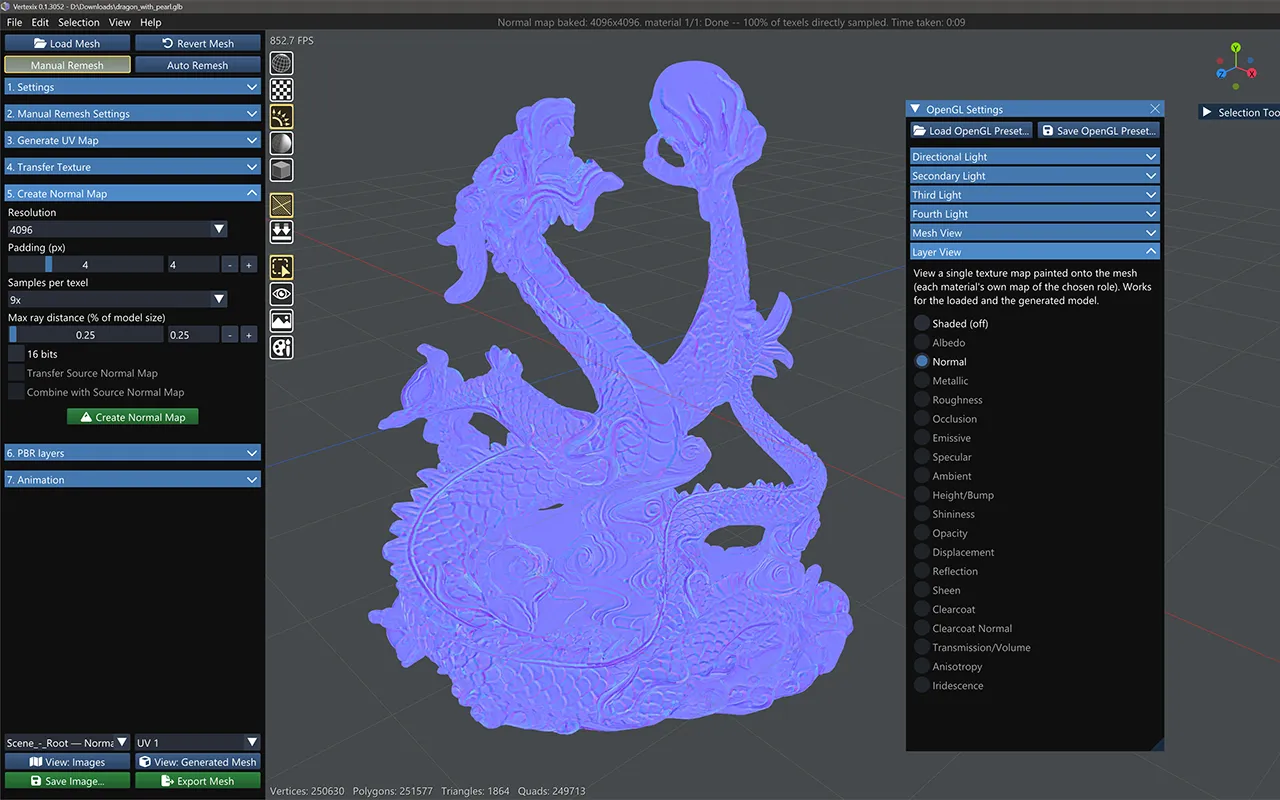
Quality controls
Same five controls as Transfer Texture, in the same order:
- Resolution — an edition-capped list: up to 1024 on Free, 2048 on Light, 8192 on Regular and 32768 on Ultra.
- Padding (px) — extra dilation so bilinear filtering doesn't leak sampled directions across seams.
- Samples per texel — 1× (off) / 4× / 9×, capped by edition; casts a grid of rays per output texel instead of one and averages the resulting directions. Reduces aliasing on fine, high-frequency surface detail that a single ray per texel would otherwise flatten into whichever one direction it happened to hit.
- Max ray distance (% of model size) — how far to search, toward and away from the surface, for the original geometry. Too small can leave gaps on deep creases or re-entrant detail; too large risks sampling the wrong part of the model.
- 16 bits — higher-precision file export only (Ultra, needs OpenImageIO); the live preview is always 8-bit.
For very fine sculpted or carved detail that still looks soft after raising resolution, raise Samples per texel first — it's the cheapest change and never alters an existing bake at its default (1×) setting — then check whether Max ray distance is wide enough to reach the bottom of deep creases without also widening it so far it risks stray hits.
Transfer Source Normal Map & Combine
If the loaded model already has its own normal map, two mutually-exclusive options change what gets baked:
- Transfer Source Normal Map — skips the geometry bake entirely and just resamples the loaded model's own normal map onto the new UV layout.
- Combine with Source Normal Map — bakes the geometry normal map and transfers the source one, then blends them with an Overlay-style blend to keep original artist detail while adding new-topology surface contribution.
A warning line appears if the source normal map's resolution doesn't match the chosen bake resolution — it'll be resampled either way.
Create Normal Map
Requires an existing UV map on the created topology.