
Generate UV Map
This panel is pixel-identical whether you reach it from Manual Remesh or Auto Remesh — both workflows converge on one created topology, and this is the same UV unwrap regardless of which engine built it.
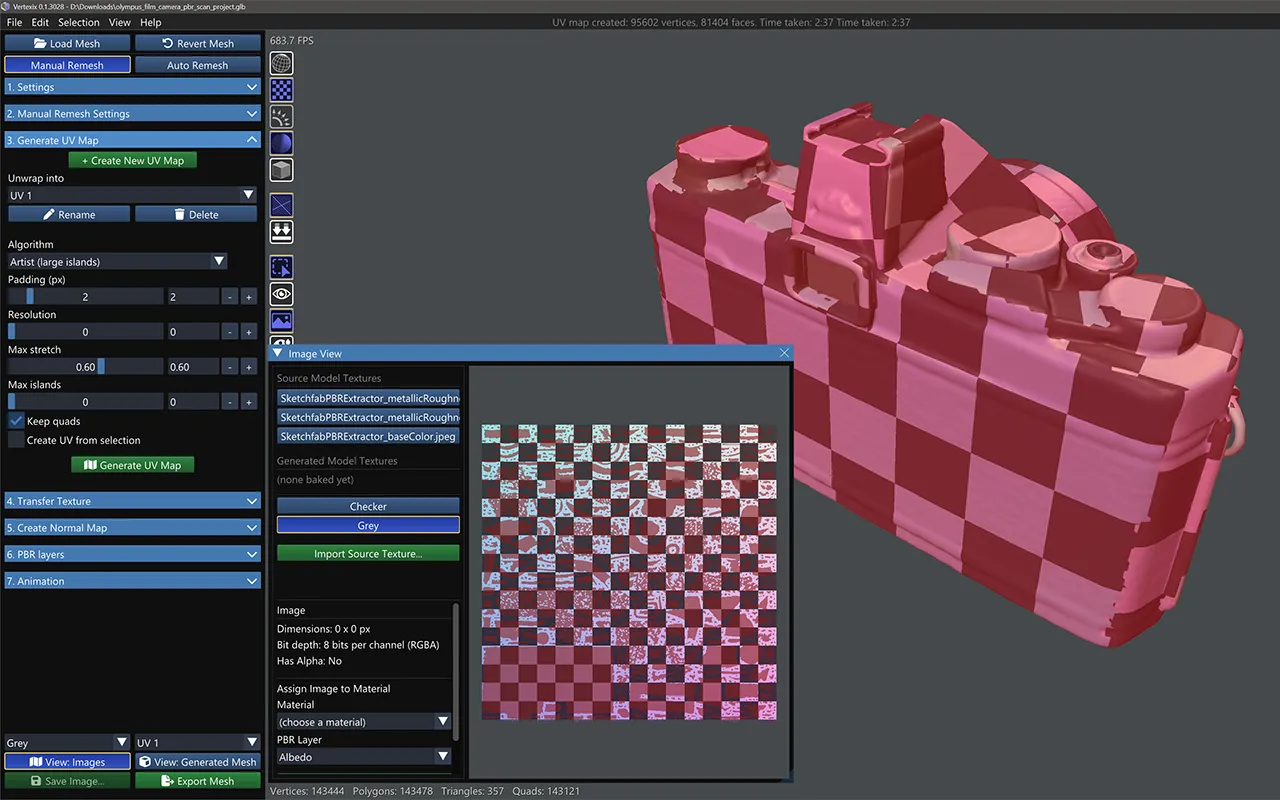
Create New UV Map, Unwrap into, Rename, Delete
Vertexix can carry several independent named UV maps on the same topology. Create New UV Map makes a new, empty one and switches to it, prompting you to name it. The Unwrap into dropdown lists every existing space; Rename and Delete sit beside it — deleting a space also removes its baked textures.
Algorithm: Artist, Lightmap, Field-Guided, Grid Unwrap or Keep Original UVs
- Artist (large islands) — Microsoft UVAtlas. Fewer, larger islands, easier to hand-edit, slower on dense meshes.
- Lightmap (many small charts) — xatlas. Fast, many small charts; used automatically as a fallback if another engine fails, and meshes over roughly 200k triangles switch to it automatically.
- Field-Guided (natural seams) — reads the same orientation/position field that guided your retopology and cuts seams along the surface's own flow instead of a stretch metric alone, then hands the result to the same Artist engine to flatten. Paint Selection Tools color groups on the created topology first to force seams exactly at their boundaries. Regular and up
- Grid Unwrap — for quad meshes, the fast path: rather than solving for a layout it walks the quad grid outward from a starting face, unfolding each neighbour a quarter turn at a time, and only uses xatlas to pack the finished shells. That makes its cost barely depend on how dense the mesh is. Regular and up
- Keep Original UVs (the model's own) — no unwrap at all. The loaded model's own UV layout is copied onto the new topology, so the textures the model already has fit it as they are, with no bake — and they are put on it straight away: the new mesh shows the model’s own albedo, normal and other maps as soon as its UVs are made. A texture or normal map you bake afterwards replaces them as usual. It works island by island. Each new face takes the UV island lying under it. Its corners are measured over that island's surface, never jumping across a seam to another part of the texture: where a face runs past an island's edge, the UVs carry straight on past it. The seams come out where the model's own seams are. A material that has no UVs is unwrapped as Lightmap instead. Every edition.
Keep Original UVs gives its best result when the new faces are about the size of the model's UV islands or smaller. On a model whose texture is cut into many tiny islands — common on game assets — a new face can be larger than the island it sits on, and some faces then come out mirrored or stretched. The texture still lands in the right place on the model, but a normal map would read wrongly on those faces. For such a model, unwrap with another algorithm and use Transfer Texture to bake the texture across instead.
Grid Unwrap earns its speed by assuming the quads really do meet at right angles, which is true of boxy and hard-surface topology and not of anything rounded. Where that assumption breaks, a component eventually folds back onto itself — and rather than hand you a silently overlapping atlas, the engine detects the overlap and gives the piece to Lightmap instead. It does the same if the mesh has no real quads, or too few to be worth the attempt.
Placing seams yourself Regular and up
Every engine above decides where to cut on its own. Seam Tools lets you decide instead. Turn on Edit Seams and click an edge to mark it; Alt+click runs the mark around the whole edge loop. The marked-edge count tells you how much you have placed, Clear All Seams starts over, and a seam set can be saved to disk and loaded back.
Suggest Seams proposes a set for you to edit rather than making you start from a bare mesh. It works from the sharp angle between faces, clusters coplanar regions, and treats anything flatter than a threshold you set as a single region.
Marked seams are forced cuts for Field-Guided and Grid Unwrap. Artist and Lightmap decide their own seams and ignore the marks, so marking edges has no effect if one of those two is selected.
For Grid Unwrap in particular, marking seams is not a refinement — it is the thing that makes the engine usable on anything that is not already boxy. The marks are the walls its walk will not cross, so they are what break a curved form into pieces small enough to stay flat.
Padding & Resolution
Padding (px) sets the gap between charts. Resolution of 0 estimates automatically from padding and chart area.
Artist & Field-Guided: Max stretch & Max islands
Both engines flatten with the same Artist (UVAtlas) core, so they share its knobs. Max stretch (0–1) bounds how much a chart may distort to reduce island count. Max islands of 0 leaves it unlimited, driven by Max stretch alone — on Field-Guided, its seams already force at least as many islands as the field found, so a cap below that floor is raised automatically rather than failing.
Lightmap-only: Bruteforce packing
Slower, but packs charts tighter into the atlas.
Keep quads & Create UV from selection
Keep quads reassembles quads in the UV atlas wherever no seam crosses the diagonal. Create UV from selection unwraps only the polygons currently paint-selected on the created topology — a different selection concept from Selection Tools' material picks, but the same painted colors Field-Guided reads to force seams when both are used together.
Advanced (Lightmap only)
Chart threshold, Chart iterations, Respect hard-edge seams, Texture seam weight, Block align, Texel density (texels/unit), and Max chart size. Hidden entirely in Artist and Field-Guided modes.
UDIM
Vertexix reads and writes multi-tile UDIM layouts natively — see Selection Tools > UDIM Tile Manager for assigning tiles, and Exporting > UDIM Tiles for how it's written out. Regular and up