
Texture
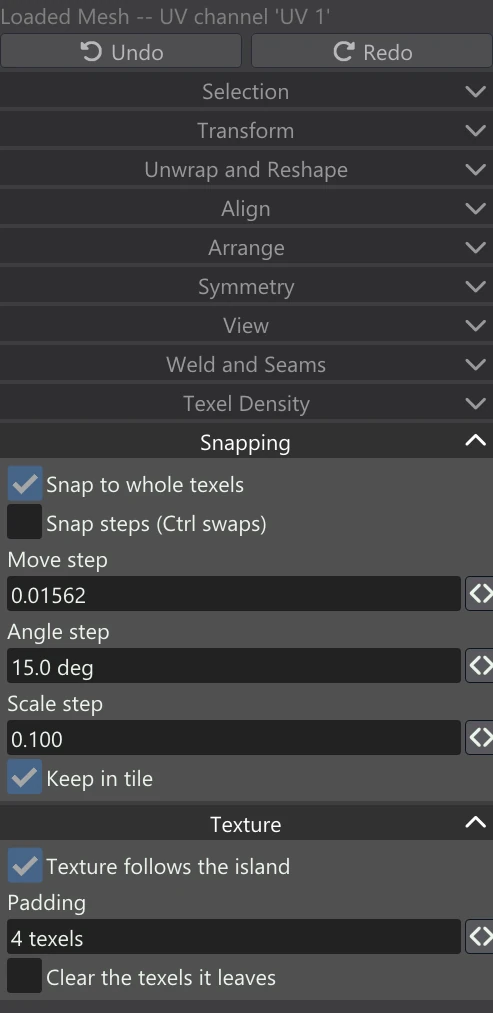
The Texture accordion decides what happens to the model's textures when you change its UVs. Normally, moving UVs over a finished texture slides the faces over a picture that stays put, so the model ends up showing the wrong part of the image. With Texture follows the island, Vertexix moves the picture with the faces instead, so the model looks the same after you rearrange its layout.
| Control | What it does |
|---|---|
| Texture follows the island | When UVs move, the texels under them move too, so baked and painted textures stay on the model as they were. Off: the picture stays put and the moved faces show whatever is under them now. |
| Padding | How much of the gutter around a moved island moves with it, 0 to 16 texels (4 by default). Baked and painted maps usually carry a border of colour (a gutter) around each island, so that filtering never reaches the background; moving that border along keeps the island from arriving at its new place with a bare edge. |
| Clear the texels it leaves | Off (the default): the texels a moved island leaves behind stay as they were. On: the texels it left that nothing covers any more are cleared — to the channel's neutral value on an image, to nothing on a painted layer, and to no protection on a layer mask. |
| The report line | After each edit, a grey line says what it did: how many UV vertices changed and how many images followed them, or for a weld or split how many it joined or cut. It also shows why an edit was refused, and what an undo or redo restored. |
What follows the island
Every image of the moved faces' materials follows, not just the one on screen:
- Every texture map of the material — colour, normal, roughness, metallic, occlusion and the rest, including maps filled by Transfer Texture.
- The Generated Mesh's bakes — normal, ambient occlusion, cavity, curvature and edge maps.
- Painted texture layers — each layer's own image moves, and the material's channel is composited again from them. Node Layers are not moved: they are made from the layout itself, so they are filled again for the new layout.
- Masks — a material's layer mask, and the Loaded Mesh's paint mask.
Normal maps are re-oriented as well as moved, so a turned or mirrored island still lights the right way. Faces carried whole by a move have their texels copied; faces stretched by a partial move (only some of their corners moved) are resampled. The work is done on the graphics card when it can be, with the processor as the fallback.
Undo puts the images back exactly as they were, along with the UVs: one Ctrl+Z undoes the move and everything that followed it.
Why the old texels are kept
Clear the texels it leaves is off by default because in a mirrored or stacked layout, another island may still use the texels the moved one left: two mirrored halves that share one set of texels, for example. Moving one half away must not erase the other's texture. Turn it on when you know the old place is unused and you want the image tidy.
Keep Snap to whole texels on while the texture follows: a whole-texel move copies texels exactly, while a move between texels resamples them and softens the texture a little each time.