
Snapping
Snapping sets how moves, turns and scales you make on the canvas land: on whole texels, in fixed steps, and inside their tile. The settings are kept between sessions.
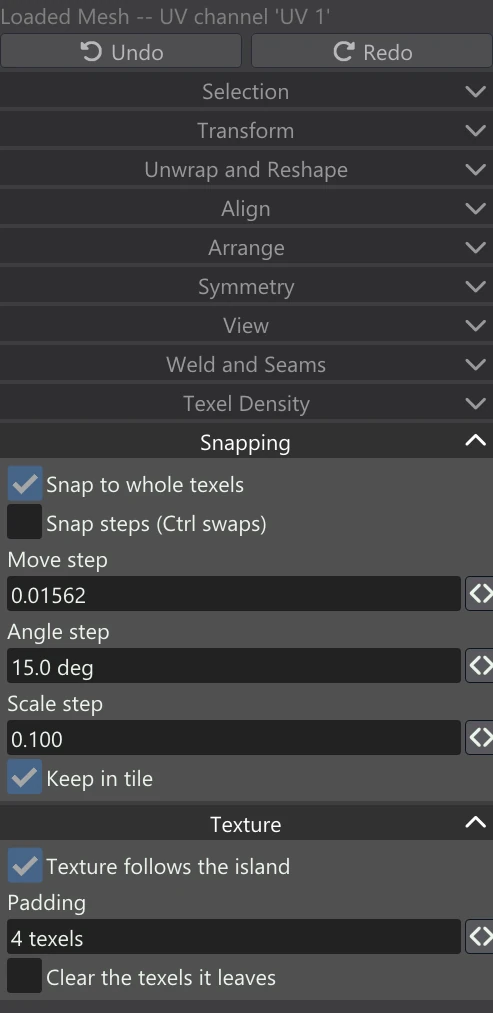
| Control | What it does |
|---|---|
| Snap to whole texels | A move lands the selection a whole number of texels away, so every texel centre lands on a texel centre. It applies to moves; turns and scales are not affected. |
| Snap steps (Ctrl swaps) | Moves, turns and scales go in the steps below. Holding Ctrl during a drag does the opposite of this setting: with it off, Ctrl snaps to the steps; with it on, Ctrl moves freely. |
| Move step | The step for moves, in UV units: 1 is the width of a tile, so the default 0.01562 is 1/64 of it. |
| Angle step | The step for turns, in degrees (1 to 90; 15 by default). |
| Scale step | The step for scales (0.01 to 1; 0.1 by default). A scale never snaps to nothing: the smallest it snaps to is one step. |
| Keep in tile | A move stops at the edge of the UDIM tile the selection is in, rather than carrying it into the next one. A selection larger than the tile is not held. |
Why whole texels matter
With Texture follows the island on, a moved island takes its texels with it. If the move is a whole number of texels, those texels are simply copied to their new place and the texture is exactly as sharp as before. If the move lands between texels, the texture has to be resampled, which softens it a little — and a little more on every further move. Keep Snap to whole texels on whenever the texture follows. When steps are on as well, the step is taken first and then rounded to whole texels, so a step that is not itself a whole number of texels still moves the texture by copying it. A flip or quarter turn that lines up with the texel grid is copied too.