
Texel Density
Texel density is how many texels of the image cover one unit of length on the model — Vertexix gives it in px per unit. When every part of a model has the same density, details are equally sharp everywhere and a tiling pattern has the same scale on every island; when it differs, some parts look blurred next to others. The Texel Density accordion measures it, sets it, and measures how much of the tile the layout uses. Measuring works in every edition; Set needs Regular and up.
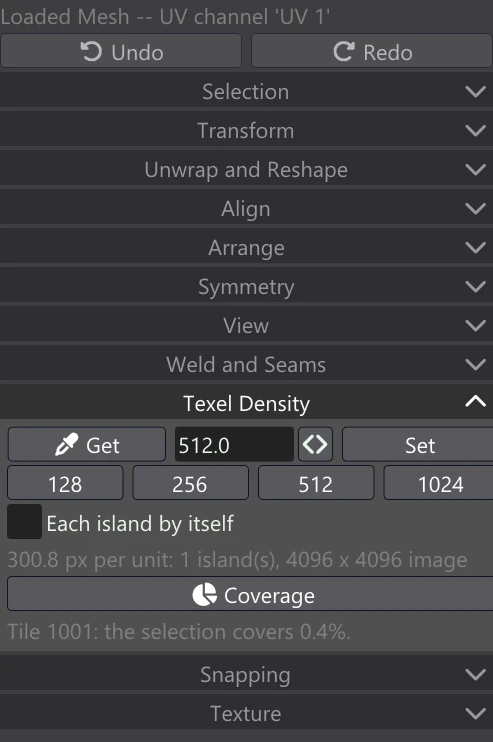
Density is measured in the texels of the selection's image: the colour map of the material of the first selected face (or another of its maps if it has no colour map). On the Generated Mesh before anything is baked, the bake resolution you have set stands in for the image's size. The same layout therefore reads twice as dense on a 4096 image as on a 2048 one.
| Control | What it does |
|---|---|
| Get | Measure the selection's texel density (every island when nothing is selected) and put it in the field. Over several islands it is the average, weighted by each island's size on the model. |
| The value field | The density, in texels per unit of 3D length, that Set applies. Type a value, or fill it with Get from an island whose density you want to copy. |
| Set | Scale the selected faces or islands to the density in the field. Islands are scaled, never reshaped. |
| 128 / 256 / 512 / 1024 | Put that density in the field and Set it at once. |
| Each island by itself | On: every island is scaled about its own centre to the density, so all of them end up equal. Off: the selection scales as one, about the middle of it all, so the islands keep their sizes relative to each other and their average reaches the density. |
| The reading line | After Get: the density, how many islands it was measured over and the image size, for example 300.8 px per unit: 1 island(s), 4096 x 4096 image. If it cannot measure, it says why (no image to measure texels in, no 3D positions, or a selection with no area). |
| Coverage | How much of the tile the faces cover: the selection's faces, or all of them when nothing is selected. It measures the tile most of those faces are in and reports it by its UDIM number, for example Tile 1001: the selection covers 0.4%. or Tile 1001: 58.3% covered. when nothing is selected Islands stacked on top of one another count once. |
The readings are cleared whenever the selection or the layout changes, since they describe the old one; press the button again for a fresh one.
Set Texel Density in the Adjust box
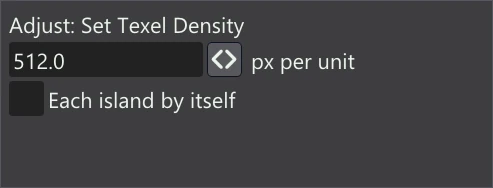
| Adjust setting | What it does |
|---|---|
| px per unit | The density to set. Change it and the scale is undone and made again at the new value, still one undo step. |
| Each island by itself | As the checkbox in the accordion: each island about its own centre, or the selection as one. |
Coverage is the other half of the picture: a higher density means larger islands, and the tile has a fixed size. After setting a density, check Coverage and the Padding preview, then pack the islands again in Arrange if they no longer fit.